
Prerequisites
Before installation:
-
Confirm that the Gateway is running Ignition 8.3.0.
-
Obtain Factory Host Agent 3.0.0 through an approved distribution channel.
-
Identify the intended Linux, Windows, or macOS host and matching Host Client package.
-
Confirm outbound connectivity from the host to the externally reachable Gateway URL.
-
Configure protected transport with a certificate trusted by the host operating system for production use.
-
Define which Gateway users may download bundles, approve hosts, request mappings, and issue commands.
-
Confirm that unsigned artifacts are permitted by organizational policy.
Installing the Module
-
Use the Ignition Gateway's standard module-management workflow to install the Factory Host Agent module.
-
Confirm that version 3.0.0 is enabled.
-
Verify that the following pages are present:
-
HostAgent Status -
HostAgent Installers -
HostAgent Settings
-
-
Verify that the
pfce_host_agentstag provider is available.
Initial Configuration
Gateway and Network
Configure the Gateway so that setup bundles contain the externally usable scheme, host, and port. When a reverse proxy is present, it must preserve the correct external request information.
The Host Client initiates the connection. Network policy must allow outbound communication from the host to the Gateway URL; the module does not require the Gateway to initiate a separate inbound connection to the host.
Gateway Settings
The active user-facing settings include:
-
Websocket Idle Timeout (seconds) -
Heartbeat Timeout (seconds) -
Max Binary Frame Size (bytes) -
Max File Chunk Size (bytes)
Changes to socket-level settings take effect after the module or Gateway restarts. Leave values at their supplied defaults unless the deployment has a tested reason to change them.
Other visible settings in this release are descriptive or not wired to runtime behavior. See User Guide & Components before relying on a displayed control.
Configuration Roles
Gateway Administrator
The Gateway administrator:
-
installs and configures the module
-
controls Gateway access
-
generates and distributes setup bundles
-
reviews and approves pending hosts
-
requests file or serial mappings
-
monitors status and results
-
revokes trust when required
Host Operator
The host operator:
-
receives and protects the setup bundle
-
extracts and starts the Host Client
-
starts or stops the Host Client's Gateway service
-
creates local mappings
-
reviews Gateway-initiated permission requests
-
ensures that the Host Client process has operating-system access to mapped resources
Host Client Setup
-
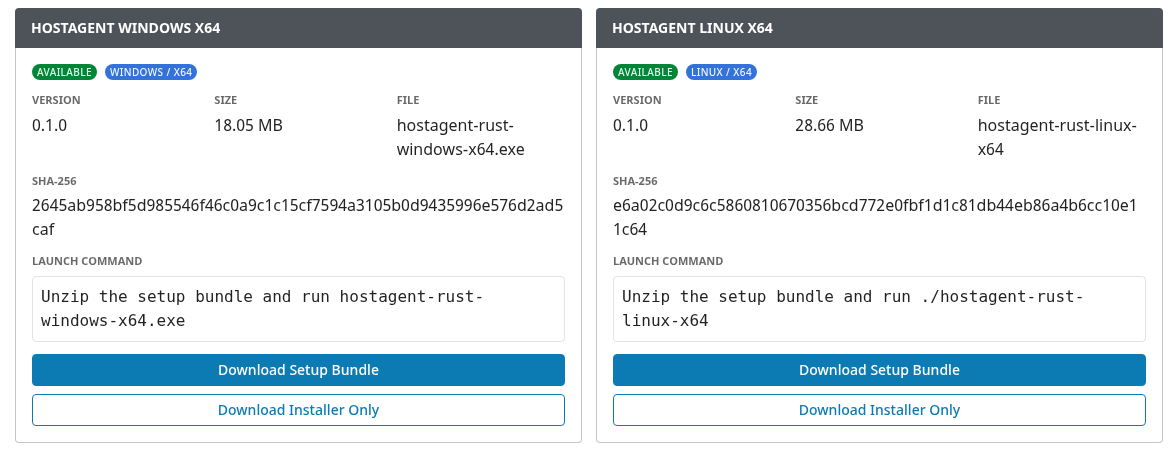
Open
HostAgent Installerson the Gateway. -
Select the package for the intended operating-system family.
-
Choose
Download Setup Bundle. -
Transfer the bundle securely to the intended host.
-
Extract it into a location protected by native operating-system permissions.
-
Run the Host Client from the extracted bundle.
-
Open
Statusand selectStart gateway service.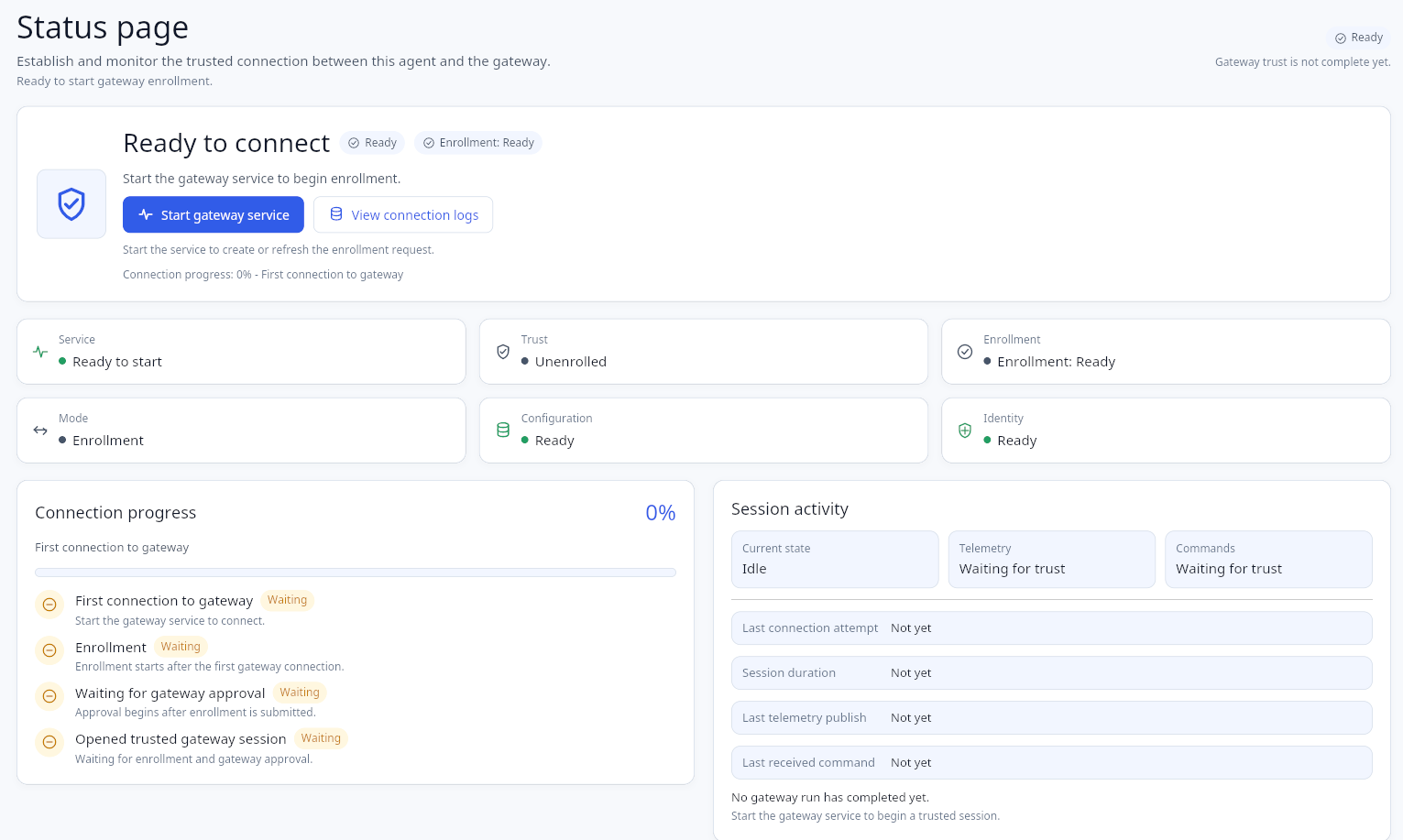
-
Keep the service running while enrollment is pending.
The setup bundle contains a live, time-limited enrollment credential. Treat the complete bundle as confidential and remove unused copies according to organizational policy.
Download Installer Only does not include normal enrollment configuration and is not sufficient by itself for standard onboarding.
Host Approval
-
Open
HostAgent Statusin the Gateway.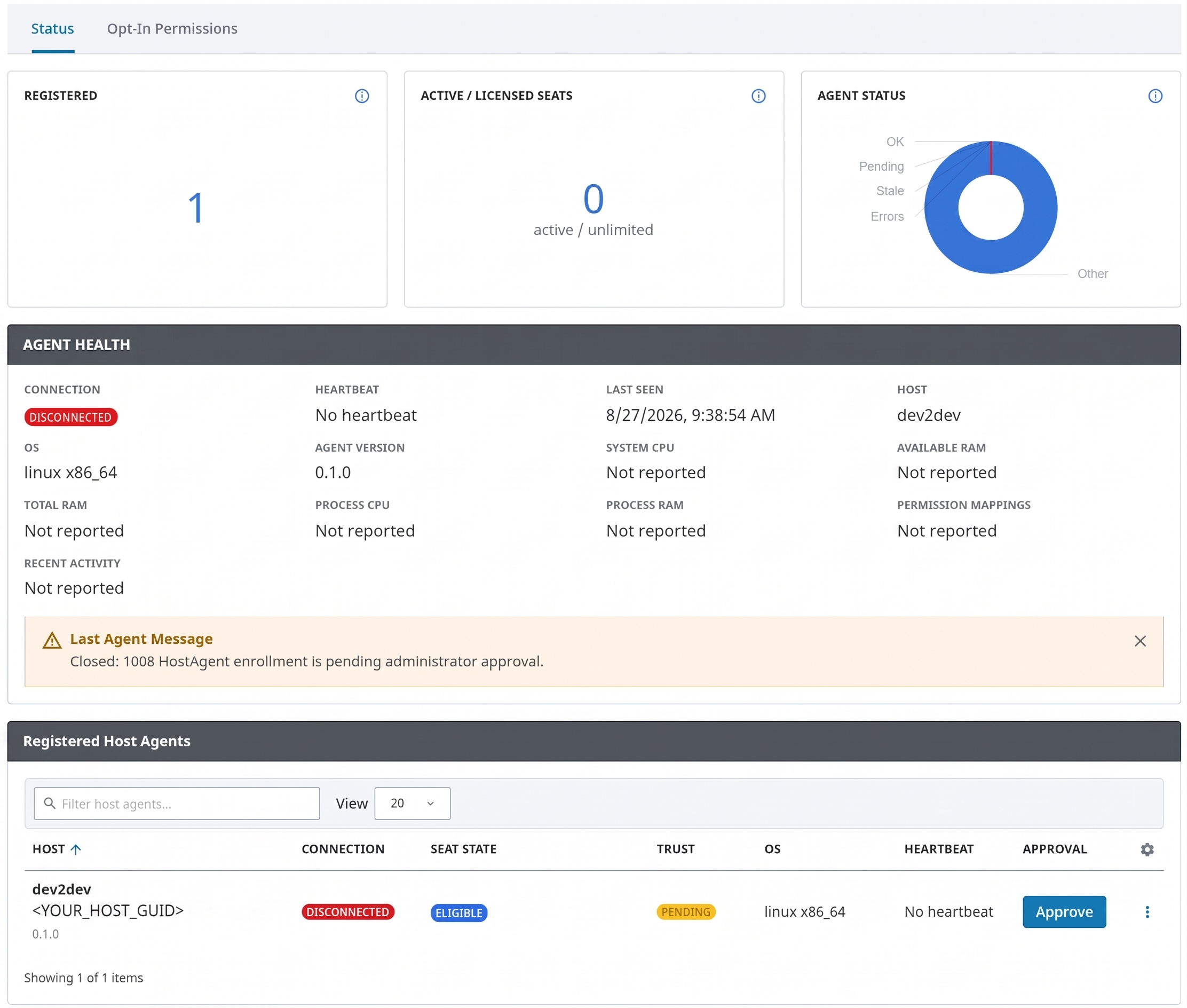
-
Locate the pending host.
-
Review the visible host identity and operating-system information.
-
Confirm independently that the request belongs to the intended host.
-
Select
Approve. -
Verify that the Host Client becomes trusted and connected.
Do not approve an unexpected or unidentified request.
File and Directory Setup
-
Open
Permissionsin the Host Client.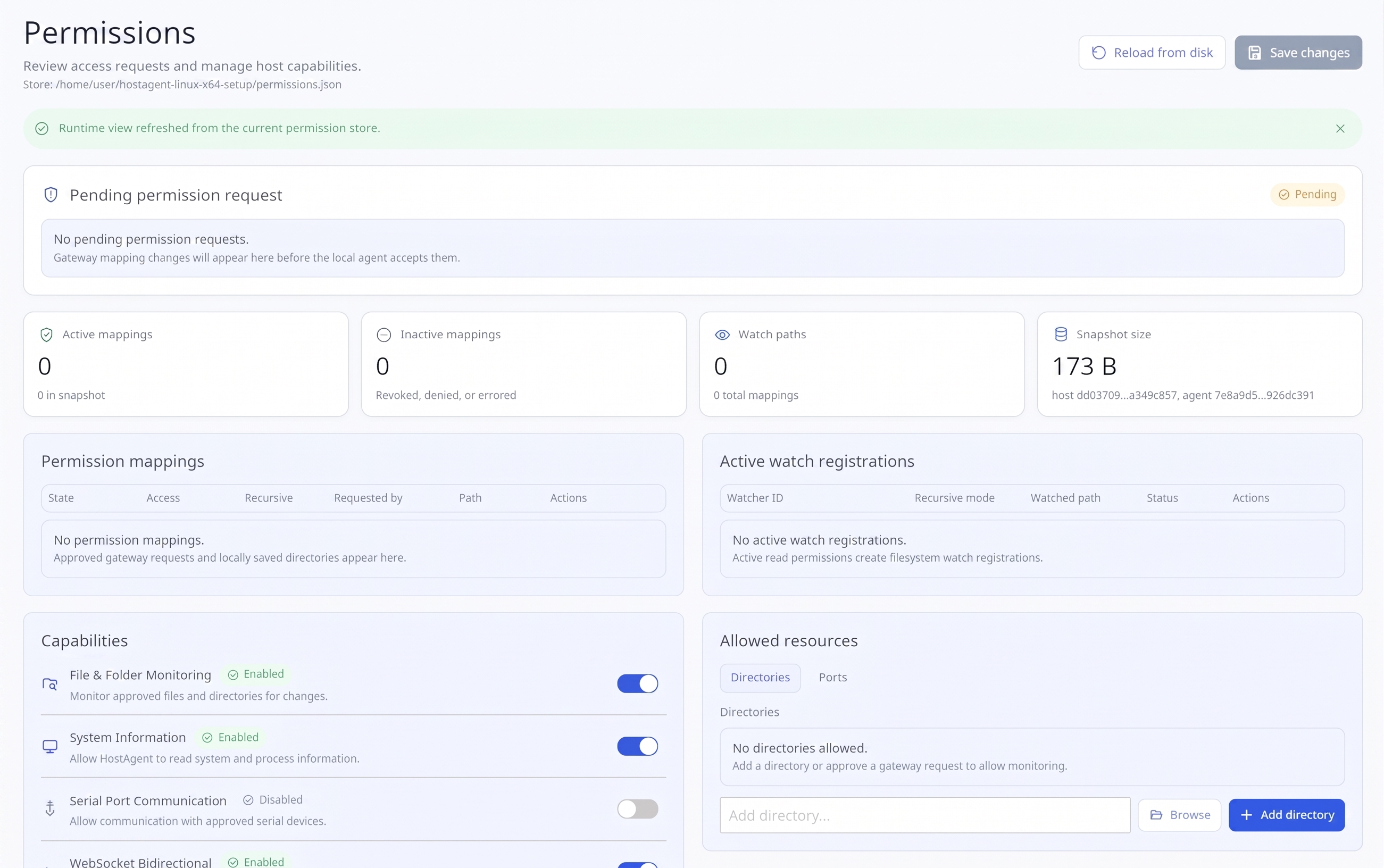
-
Under Allowed resources, add an explicit directory path or review a Gateway request.
-
Choose the narrowest scope and access mode that supports the workflow.
-
Review the
Diff & confirmsummary. -
Select
Apply changes. -
Keep the Gateway service running so the updated snapshot reaches the Gateway.
-
Verify the mapping in
Opt-In Permissionsand in the managed tags where applicable.
Read-write mappings may permit replacement or permanent deletion. Avoid broad recursive mappings when a narrower mapping is sufficient.
Serial Setup
-
Confirm that the host operating system detects the serial port.
-
Add a specific port mapping in
Permissionswhen possible. -
Use
Allow all serial portsonly when broad access is intentionally required. -
Save and confirm the mapping.
-
Locate the authorized port in the
serialarea of the managed tag provider. -
Configure the device settings and apply them.
-
Connect the port and confirm the reported current state.
Security Recommendations
-
Use protected WebSocket transport for production.
-
Use a certificate trusted by the host operating system and matching the configured Gateway hostname.
-
Apply least-privilege Ignition access to installer, approval, permission, and command operations.
-
Protect setup bundles and extracted Host Client configuration as sensitive material.
-
Protect Gateway backups containing module identity and trust state.
-
Approve only verified hosts and narrowly scoped mappings.
-
Do not work around certificate validation or manually alter identity information.
-
Confirm the risk acceptance process for unsigned artifacts.
Verification
After setup, confirm:
-
the module is enabled
-
the Host Client service is running
-
the host is connected and trusted
-
heartbeat and telemetry values continue updating
-
the intended mappings are active
-
the
pfce_host_agentsprovider shows the host -
approved files or serial ports appear as expected
-
command acknowledgements or transfer results confirm completed operations