
Sender Setup
On the sending gateway, open settings page.
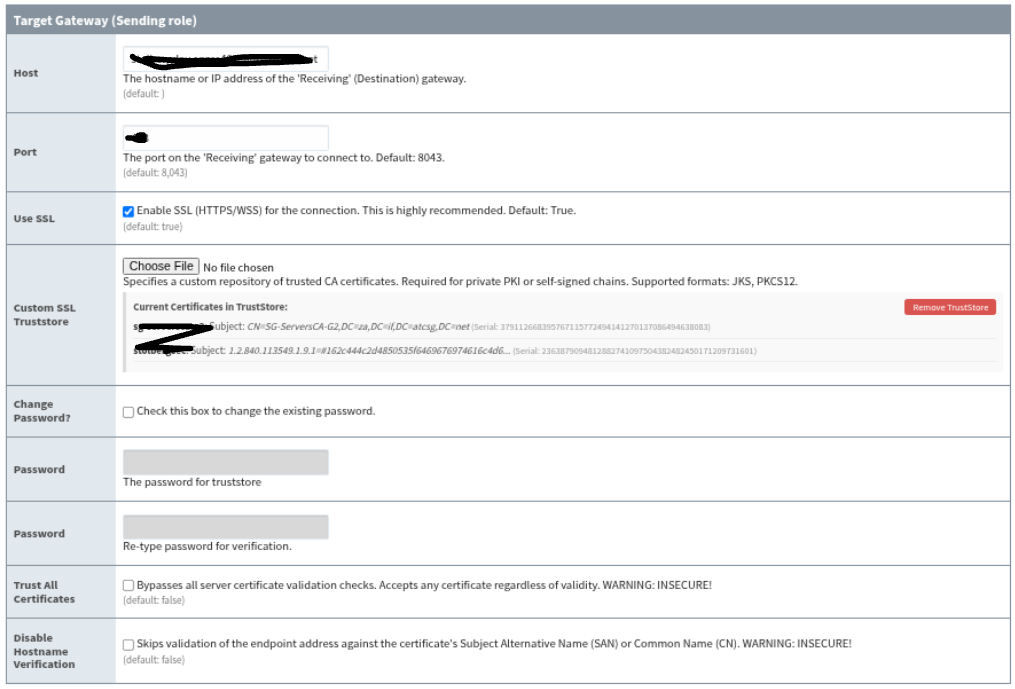
Set:
-
Enabled: on
-
Role: Sending
-
Host: receiver gateway hostname or IP address (your Ignition webpage settings)
-
Port: receiver gateway web port
-
Use SSL: on when connecting through HTTPS, off when connecting through HTTP
Typical Ignition ports are 8043 for HTTPS and 8088 for HTTP, but use the actual web port configured on the receiving gateway.
After saving, the sender connects to:
ws://<host>:<port>/system/mirror-receiver-ws
wss://<host>:<port>/system/mirror-receiver-ws
The sender status should move
-
from disconnected or connecting
-
to waiting for receiver approval.
SSL And Certificates
When Use SSL is enabled, the sender uses wss.
For testing, Trust All Certificates can be enabled so the sender accepts the receiver certificate without a custom trust store.
For production, prefer a trust store:
-
Enable Use SSL.
-
Leave Trust All Certificates off.
-
Upload a PKCS12 or JKS trust store that contains the receiver certificate chain or issuing CA.
-
Enter the trust store password if the file is password protected.
-
Save the settings.
Hostname verification is always enforced for SSL sender connections. The Host value must match the receiver certificate subject alternative name or certificate name. The legacy ignore-hostname-verification option is not available in the 8.3 sender path.